
Before you start
- Check your sensor/meter type. Sensor offline alerts work for power meters, current sensors and pulse counters. Each type reports offline in a different way, see below.
- Avoid false alerts from current sensors. Do not set up an alert for a current sensor on a machine that is switched off in the evening or at the weekend. When the machine is off, the sensor is off too, and you get a false alert.
- Want an alert when a bridge goes offline? Use a bridge offline alert. See Setting up a bridge offline alert.
How the alert knows a sensor is offline
- Current sensor (Electricity) — The current sensor gets its power from the asset it measures. When the asset is off, the sensor is off and sends no data. The platform cannot tell this apart from a real fault. If the sensor sends data, it counts as online. If it sends no data, it counts as offline.
- Power meter (Electricity) — The power meter tells the difference between "no consumption" and "no data". When the machine is off, it still counts as online.
- Pulse counter (Gas, Water, OEE) — The pulse counter sends a signal every hour, even when nothing is measured.
Step-by-Step Instructions
- Click Alerts in the header bar.
- Open the Configuration tab.
- Create a new alert.
- Select Connectivity as the product.
- In Select type of alert, select Sensor offline alert.
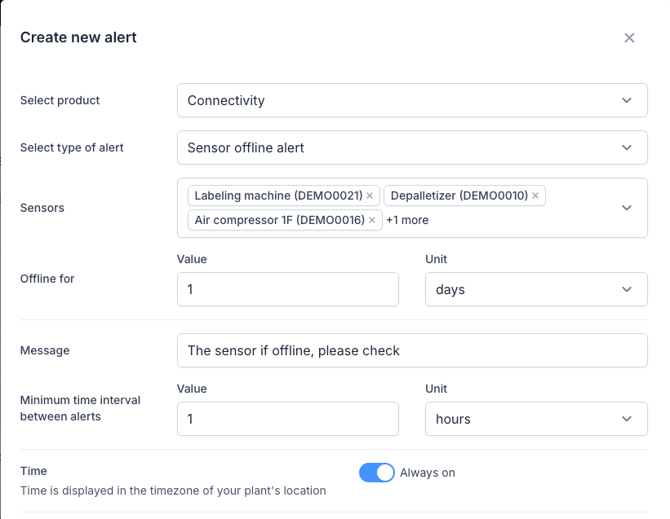
- Select the sensors you want to monitor.
- Set Offline for: how long a sensor must be offline before you get the alert.
- Write the alert message.
- Set the minimum time between two alerts.
- Choose when the alert runs: always, or on a schedule, such as during production hours.
- Add the recipients by email or WhatsApp.
- Click Save.
What to do when you get an alert
- Open the Status page and check if the bridge of this sensor is also offline. If it is, fix the bridge first. See Setting up a bridge offline alert.
- You get alerts for a current sensor, but the sensor is fine — the machine was probably switched off. Set the alert to run on a schedule, only during the hours the machine is running.
- Sensor says offline — see Troubleshooting for an offline current sensor or contact our support team.