
Before you start
- Check which sensors use which bridge. Open the Status page to see the sensors connected to each bridge.
- Check your product. Bridge offline alerts work for Electricity, Gas, Water and OEE.
- Want an alert for one sensor instead? Use a sensor offline alert. See Setting up a sensor offline alert.
Note: The alert looks at sensor data, not at the bridge itself. If the bridge sends sensor data to the platform, it counts as online. If the bridge sends no sensor data to the platform, it counts as offline.
Step-by-Step Instructions
- Click Alerts in the header bar.
- Open the Configuration tab.
- Create a new alert.
- Select Connectivity as the product.
- In Select type of alert, select Bridge offline alert.
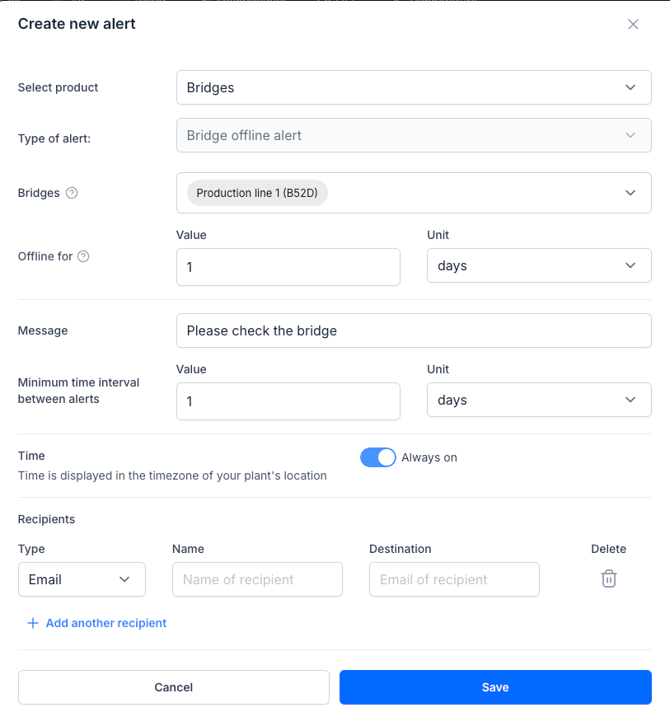
- Click Select bridges.
- Select the bridges you want to monitor.
Note: One alert can cover several Bridges. Add all bridges at your site to the same alert. - Set Offline for: how long a bridge must be in offline before you get the alert
Note: Pulse counters (Gas, Water, OEE) send a signal every hour, even when nothing is measured. Electricity sensors do not. If a machine is switched off, its Electricity sensor sends no data, and the Bridge can look offline. Choose an Offline for time longer than your longest normal stop, such as a weekend. - Write the alert message.
- Set the minimum time between two alerts.
- Choose when the alert runs: always, or on a schedule, such as during production hours.
- Add the recipients by email or WhatsApp
- Click Save
What to do when you get an alert
- Check that the bridge has power.
- Check that the bridge has an internet connection.
Note: If a bridge goes offline, it does not necessarily mean that data is lost. In most cases, it simply results in a delay in sending data to the platform. Once the bridge comes back online, it will transmit the stored data. The bridge can retain data for about up to a month.
What if it doesn't work?
- You get alerts, but the bridge is fine — the machines on that Bridge were probably switched off. Increase the Offline for time, or remove that Bridge from the alert.
- The bridge stays offline — see Troubleshooting an offline Bridge or contact our support team.